
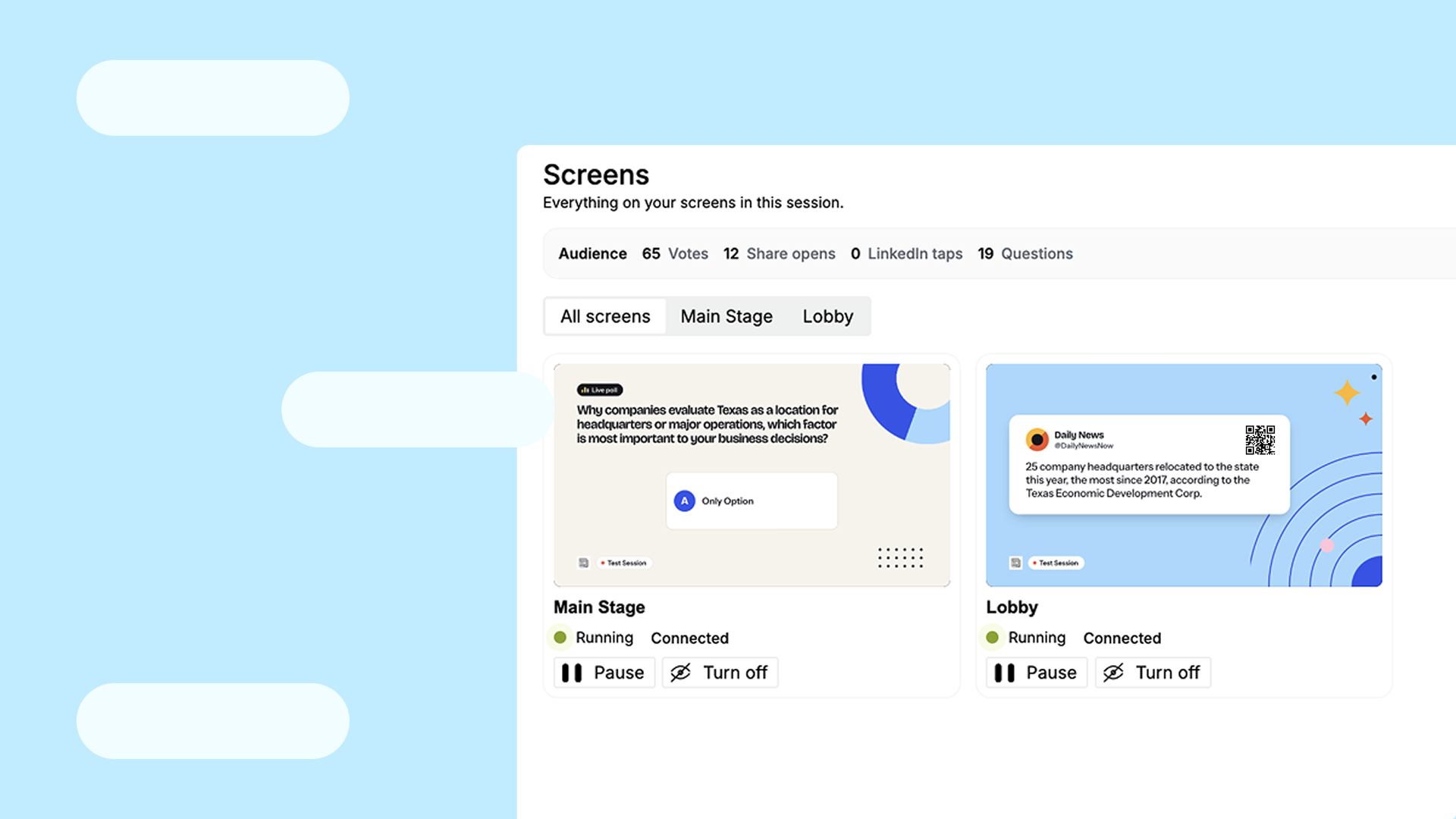
The new solution for events businesses amplifies important insights and perspectives from industry voices in real time.
Stage Desk is the live workspace for event teams. While a session is still going, an agent listens and pulls the moments that matter. The producer decides what it may send on its own, to the screens, the attendee page, email, a CMS, or wherever else it needs to go. The team stays in the room.
We're excited to announce Stage Desk, a new way for event companies and B2B publishers to work a live session. The recording keeps going. The agent makes the content and puts it in front of people before the next speaker starts.
No waiting for the recording to finish. No transcript handoff the next morning.
How It Works
Stage Desk follows the session, so the producer can stay in it. Every few minutes, the producer can drop a clip on whatever just happened. Or they leave it to the agent, which clips on its own when a line, a stat, or a turn in the discussion is worth keeping. From those clips the agent pulls the key quotes and packages them as social posts, quote cards, and short recaps. It writes poll questions from what the room is talking about and packages those too. It sends each one where the producer has said it should go: the Edisource stage screens in the room, the attendee page, an email platform, the CMS, or another destination the team already publishes to. The producer sets that autonomy for the whole session, or only for certain kinds of content. Key quotes can go out on their own. Closed captions can run on their own. A poll, a social post, or a recap can be set to wait for the team.
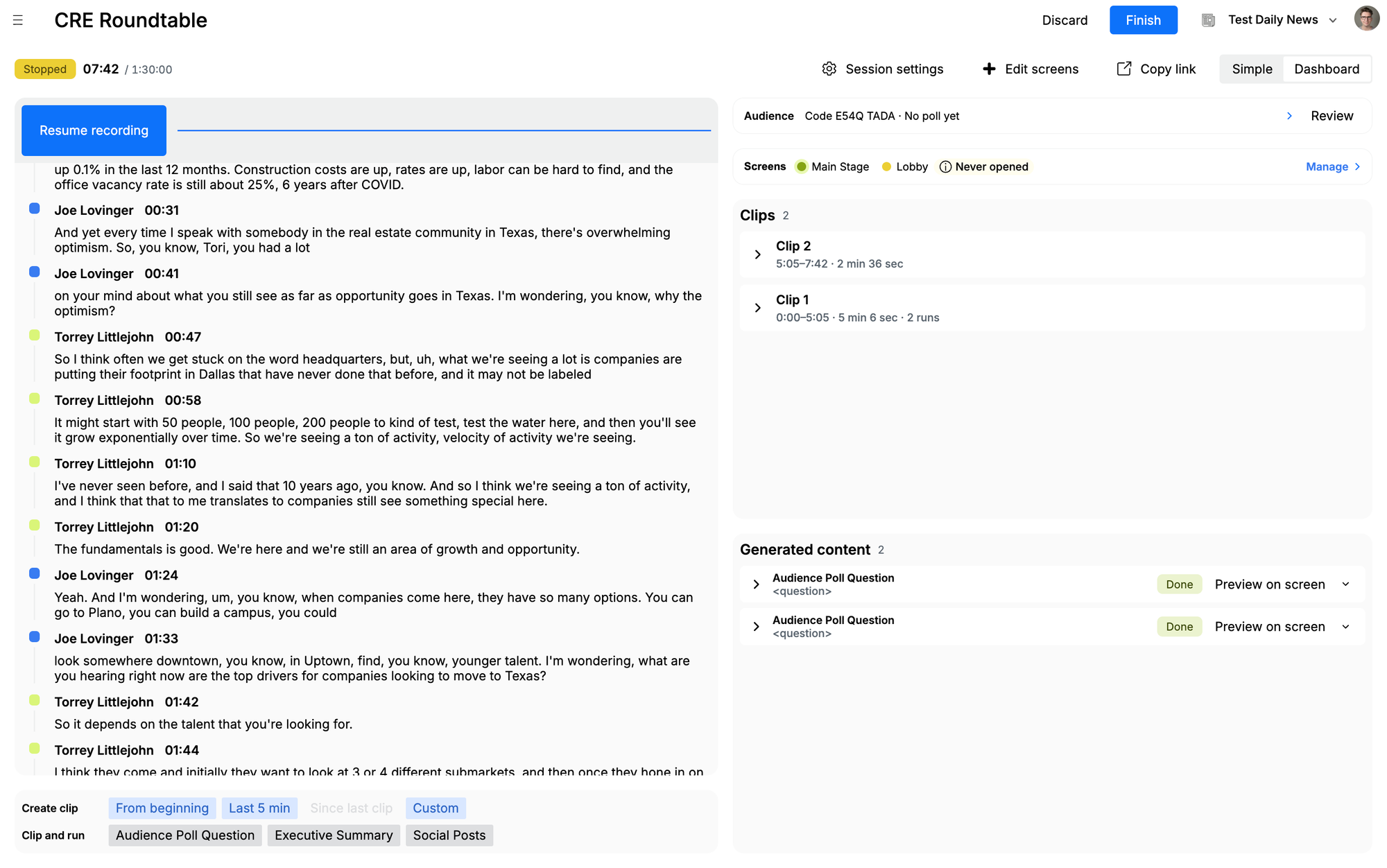
The CRE Roundtable in Stage Desk. The live transcript is on the left. Clips and generated content are ready to send on the right.
A keynote speaker lands a line the room reacts to. The agent has already clipped it. It turns the line into a quote card and a social post, and sends both to the main screen and the session landing page in the same minute. The room sees it. People who are not in the room see it. The same card can go into the show newsletter or the CMS before the next speaker walks on.
Getting this running does not take a broadcast setup. When the venue already has an AV feed, the team can plug that in. It is not required. A phone mic a few feet from the stage is enough to capture the session.
Screens work the same way. Stage Desk does not have to tie into the venue's show-control system. Share a URL with the person running the screen you want. They open it. What the agent sends shows up there.
The screens and the landing pages are the event's, not a stock look the organizer has to live with. The team sets the type, the color, the logo, and the layout so the room feels like their show. Charts, graphs, and other graphics can animate in. A poll result can arrive on the screen the way the event wants it to arrive.
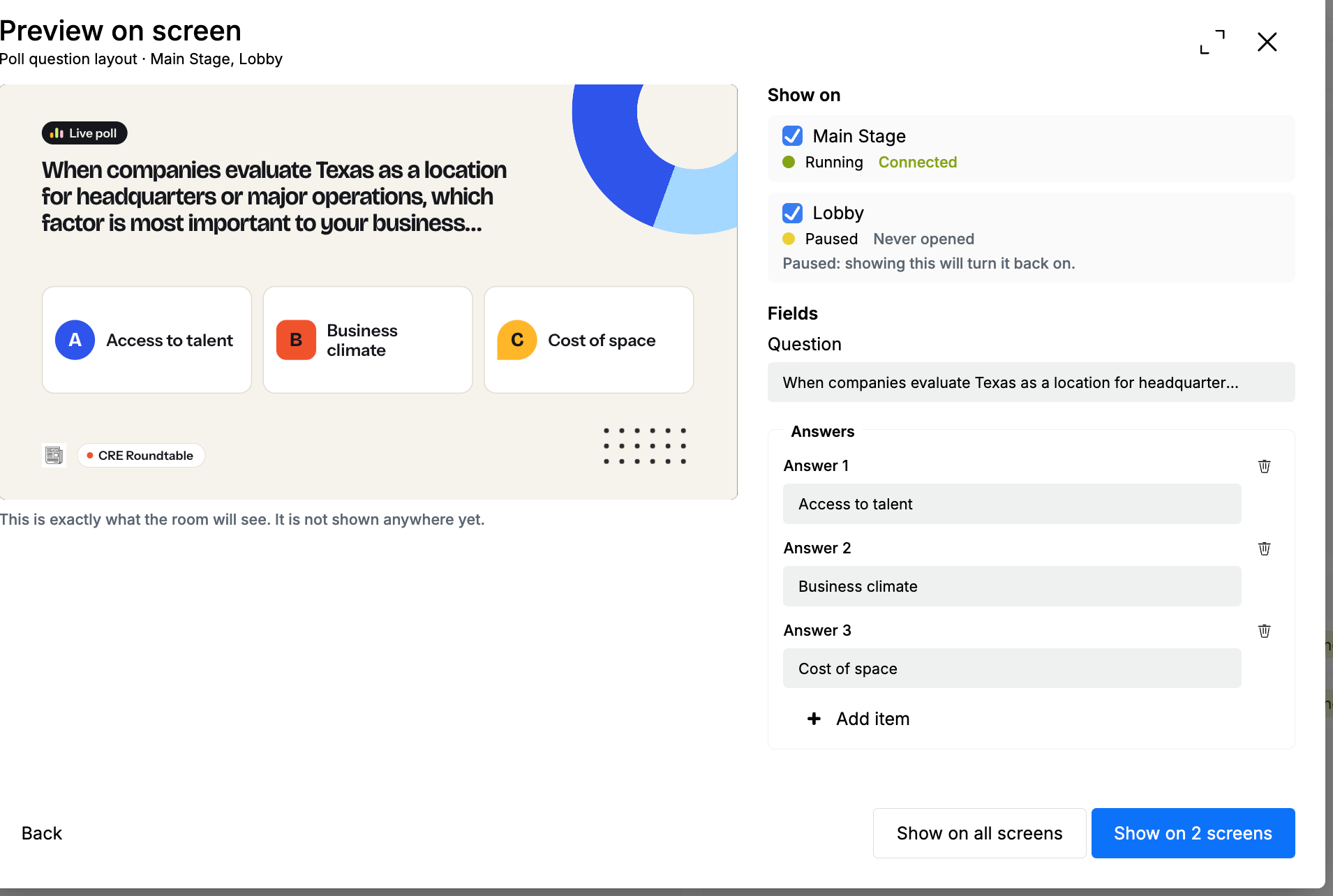
An AI-Generated poll for the CRE Roundtable, previewed in the event's own screen layout before anyone in the room sees it.
What Else Your Team Can Do
You decide what it publishes. The producer has full control over what goes out. They set the agent's autonomy for the session, or only for certain kinds of content, such as key quotes or closed captions. A producer can also drop a clip every few minutes when they want one.
Set it up once. Before the event, save which templates to run, which content the agent may deliver on its own, and where the results should go. The agent follows that plan for the show. The same plan is ready for the next one.
Let attendees share on LinkedIn. A proofed quote or social post becomes a LinkedIn link card behind a QR code. The attendee posts it from their own account.
The Audience View
The session also keeps a record of how the room responded. Open it during the session or after. The poll is there, with the votes by choice, along with the totals for votes, questions, share-page opens, LinkedIn taps, and recap opens.
Attach the session to the event and upload the registration list. People confirm an email on their phone. The list shows the name, the company, whether they were on the list, and what they did. A vote still counts when someone never gives an email. Export the list when the team needs it in a spreadsheet, or anywhere else.
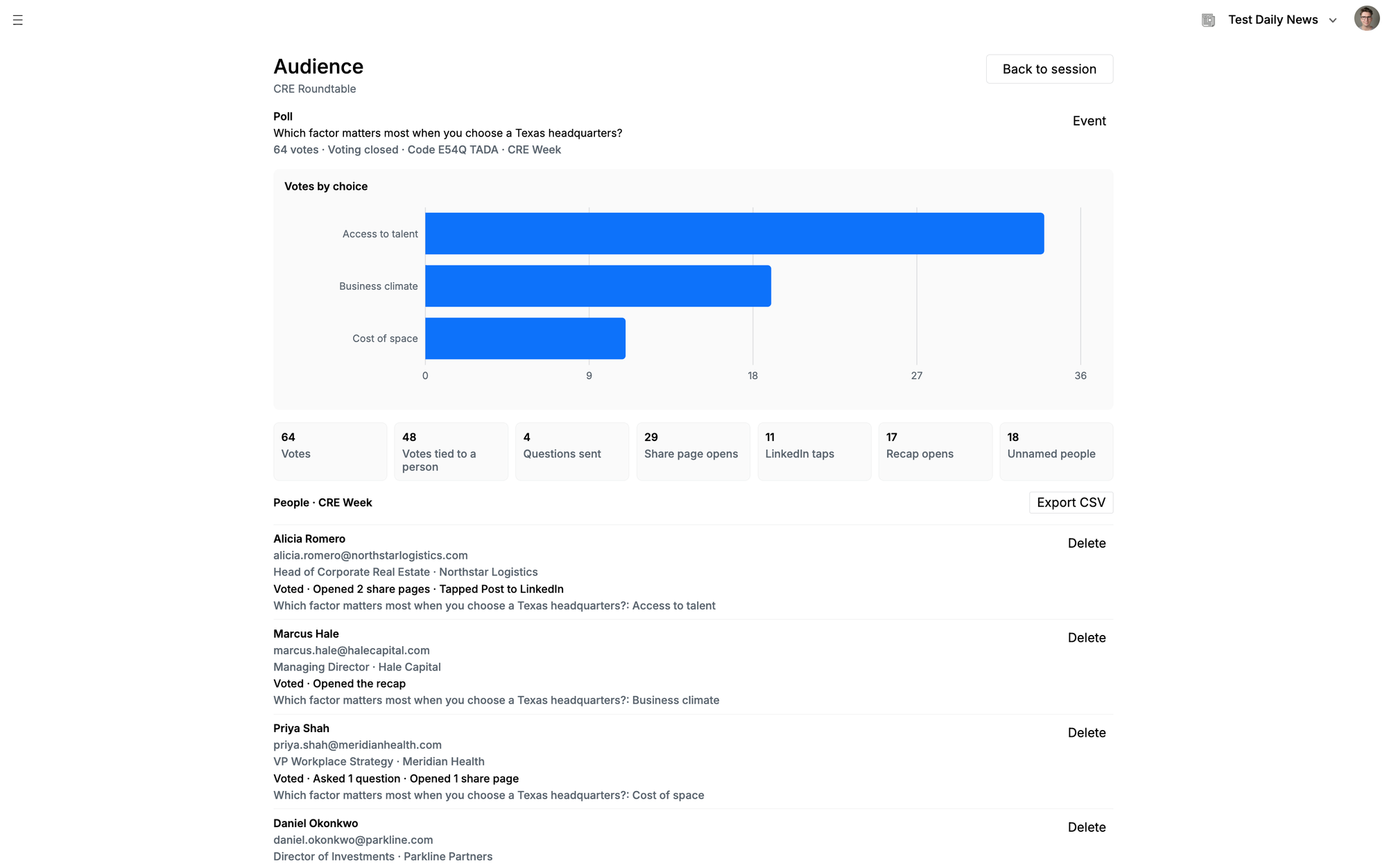
The audience view for the CRE Roundtable. The poll, the votes by choice, and the people who took part.
What Makes Stage Desk Different? It's Your Content.
Most event AI products sell a standardized attendee experience: the same summaries, the same hub, the same screens. The organizer ends up fitting the event into the vendor's format.
Stage Desk is the content team's workspace. The templates and the voice are the ones you already use in Edisource, and the output is yours. Quotes trace back to the transcript. The team can be in the session, with the speakers and the sponsors, while the agent runs the content.
Stage Desk is not a replacement for the event app. It turns what is said on stage into content the team can use in the room and after, in their own formats, and sends it to the places they already publish.
Connected to the Tools Events Already Run On
Sessionboard. Stage Desk pulls session information from Sessionboard, including title, speakers, room, and time, so a producer does not retype the agenda.
Attendee badge platforms. Badge data tells Stage Desk which sessions a person attended, so content and follow-up are tied to the sessions they actually sat in, not the whole event.
HubSpot. People and their session activity can go straight to HubSpot.
Edisense. Stage Desk connects directly to Edisense, Edisource's hyperpersonalized lead-gen platform. Events companies can run lead-gen campaigns to attendees from the same system, personalized from what each person attended and engaged with.
Stage Desk in Action
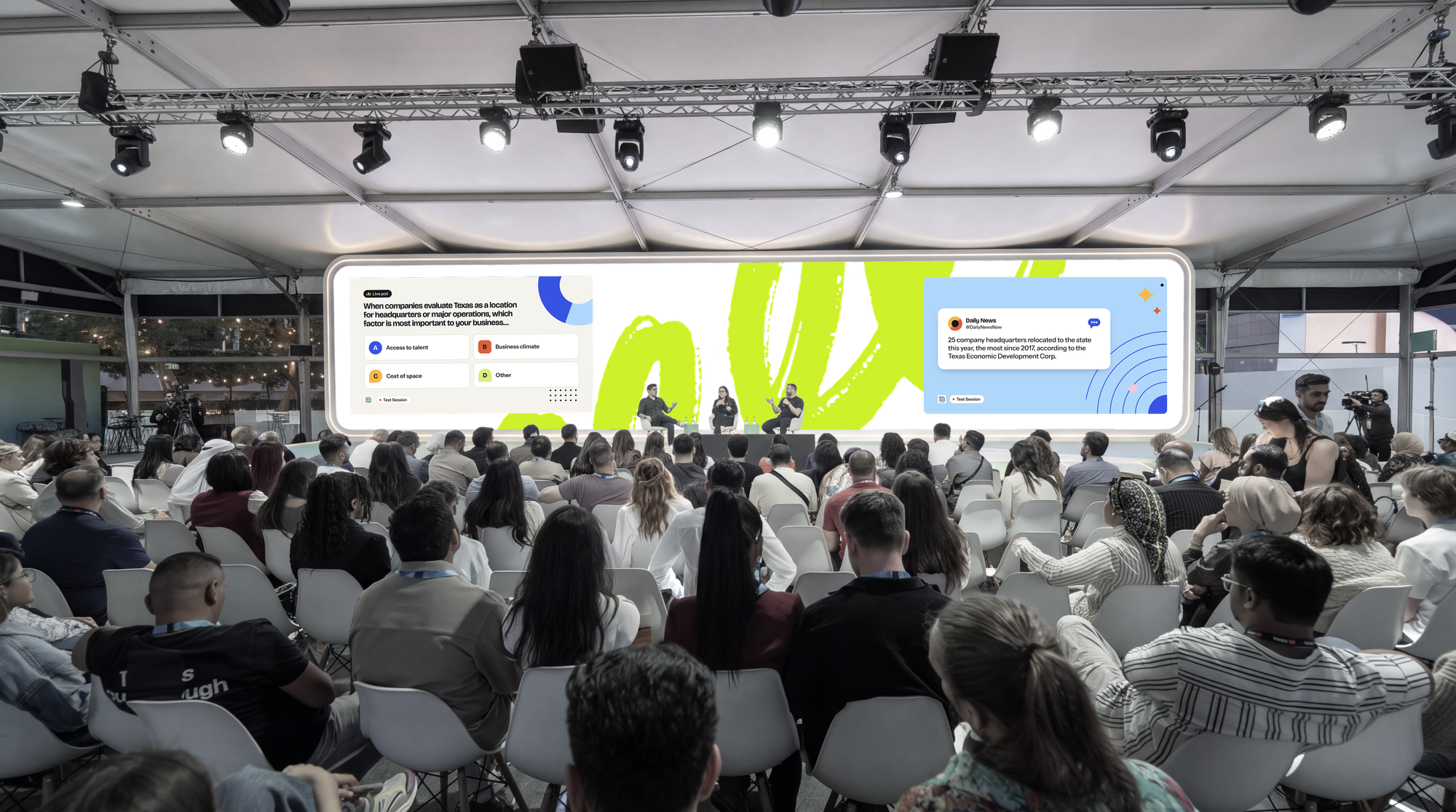
Example: Midway through a panel, staff open a poll on the attendee page and put it on the screen. Votes come in from phones around the room, and the result stays hidden until the moderator is ready. Staff reveal it on cue. A chart can animate in with the result. After the session, the tally and the people who took part are there for the team.
Example: An events company sells a sponsored poll for the afternoon track. The sponsor's name is on the screen, in the event's own layout, and a sponsored recap goes out after the session. Stage Desk tracks who voted, who opened the share page, and who tapped LinkedIn, so the team can show the sponsor how the room engaged. Screen moments, polls, and recaps become inventory the team can sell.
Example: Two sessions are running at once. The supply chain keynote is next door, and the marketing track is full. A producer in the keynote sends a proofed line to a screen in the other room: "Meanwhile in the supply chain keynote." People who could not be there scan the QR and get an executive summary of the session they missed.
Example: The day after the conference, the team does not email the whole registration list. Badge data shows who sat in each session, HubSpot has their activity, and Edisense runs a lead-gen campaign to the people who were actually in the room, personalized from what they attended and engaged with. A sponsor or the events company can run that campaign directly.
Built on a Foundation of Trust and Control
The producer has full control over what gets published. They configure the agent to the level of autonomy they are comfortable with, for the whole session or for a single kind of content. Key quotes can go to the screen on their own. Closed captions can run for the session. A poll or a recap can wait until someone on the team sends it. Every quote traces back to the transcript it came from. Poll results appear when the team reveals them, and attendees share from their own accounts.
Get Starte
If you already use Edisource, you can open Stage Desk and set up your next event. We're offering free access to Stage Desk to existing Edisource customers through the end of the year.

